Pay for Order
Send customers a payment link for unpaid WooCommerce orders. They pay on Square Hosted Checkout — no card form on your order-pay page.
Send a payment link
- Open WooCommerce → Orders and edit an unpaid order.
- Under billing details, use:
- Email payment link to customer — sends via WordPress mail
- Copy payment link — share manually
- You can also use Order actions → Email Square payment link to customer.
Customer experience
- Customer opens the secure order-pay link.
- They click Pay and complete payment on Square.
- They return to your site when done.
- Order status updates to Processing after Square confirms payment.
!!! note This flow avoids common on-site Square errors (e.g. EMPTY_VALUE on order-pay pages) because there is no embedded card form.
Automatic payment reminders
Automatically email customers who have not paid yet. Each reminder includes the same Square Hosted Checkout payment link as manual Pay for Order.
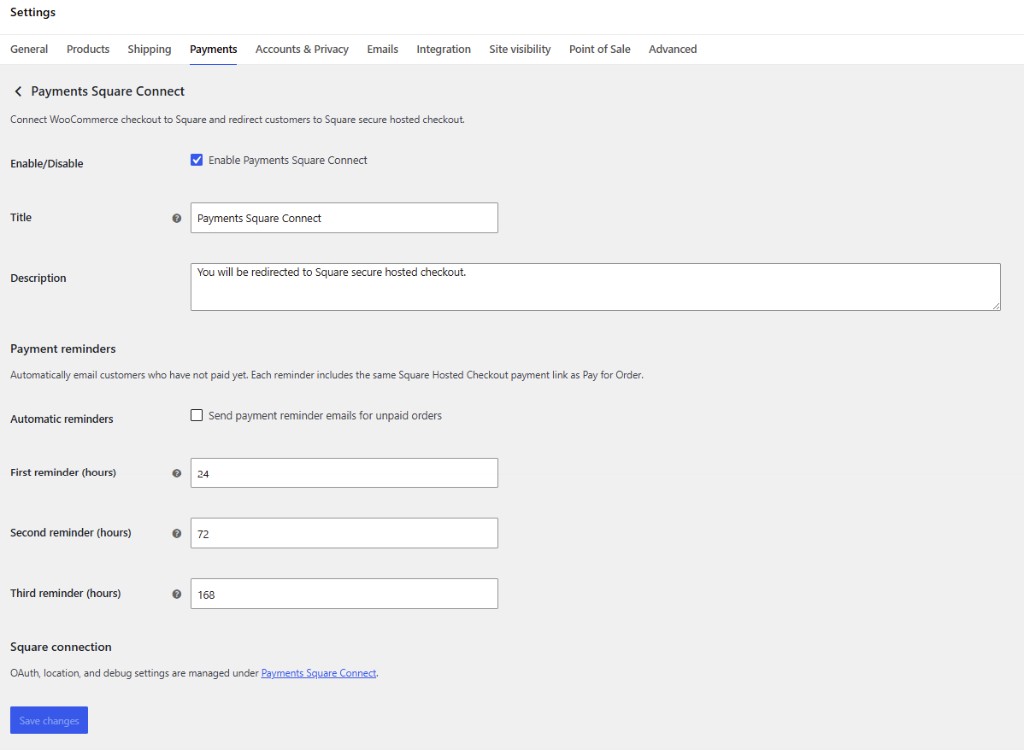
Enable reminders
- Go to WooCommerce → Settings → Payments → Payments Square Connect.
- Under Payment reminders, check Send payment reminder emails for unpaid orders.
- Set how many hours to wait before each reminder:
- First reminder — default 24 hours after the order (or after the last reminder)
- Second reminder — default 72 hours after the first; set 0 to disable
- Third reminder — default 168 hours (7 days) after the second; set 0 to disable
- Click Save changes.
Reminders run on an hourly schedule. Each sent reminder is logged on the order notes.
Which orders get reminders?
- Status Pending or On hold, still needing payment
- Billing email present
- Payment method Payments Square Connect, or a payment link was already emailed from the order screen
Developer hook: shc4wc_payment_reminder_sent
REST API / automation
Admins can automate payment links via the REST API namespace shc4wc/v1:
GET /wp-json/shc4wc/v1/statusPOST /wp-json/shc4wc/v1/orders/{id}/send-payment-link
Developer hook: shc4wc_pay_for_order_email_sent