Subscriptions
Sell subscriptions through Square subscription plans on WooCommerce, Paid Memberships Pro, Contact Form 7, or WPForms.
→ Paid Memberships Pro — Square without WooCommerce Subscriptions
1. Create plans in Square
Create subscription plans in your Square account. See Square's Subscription Plan Checkout docs.
2. Copy plan IDs
Open Payments Square Connect → Subscription Plans in wp-admin. Copy the plan or variation ID you need.
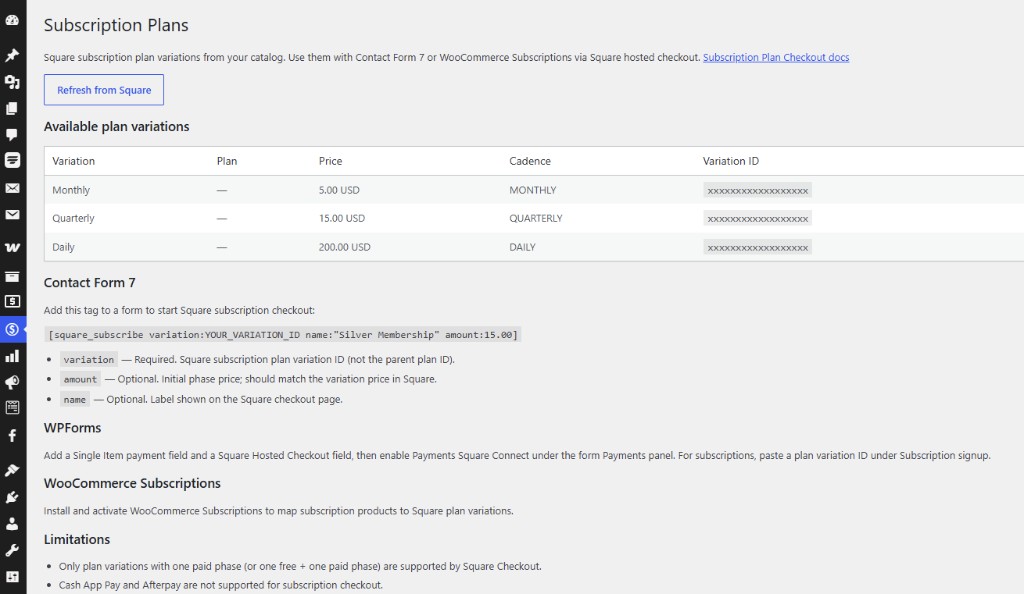
3. Connect to your product or form
| Platform | How |
|---|---|
| Paid Memberships Pro | Enable Square Hosted Checkout (Payments Square Connect) under PMPro → Settings → Payments — full PMPro guide |
| WooCommerce | Assign plan ID to subscription products (WooCommerce Subscriptions) |
| Contact Form 7 | [square_subscribe variation:PLAN_ID name:"Plan" amount:15.00] |
| WPForms | Configure subscription on the Square Hosted Checkout field |
Renewals and refunds
- Recurring charges billed by Square → refund from Square Dashboard
- Initial signup order (WooCommerce) → can be refunded from wp-admin if it was a hosted checkout payment with a stored payment ID
Wallet limits
Cash App Pay and Afterpay are not available for subscription signup on CF7 or WPForms forms.