Payment links
Add a Pay Now button without WooCommerce or a form plugin. Customers pay on Square Hosted Checkout.
Shortcode
[square_payment_link amount="25.00" label="Pay Now"]
Alias: [square_pay_link]
Optional attributes: description, currency (when supported).
Gutenberg block
- Edit a page or post.
- Click + to add a block.
- Search for Square Payment Link.
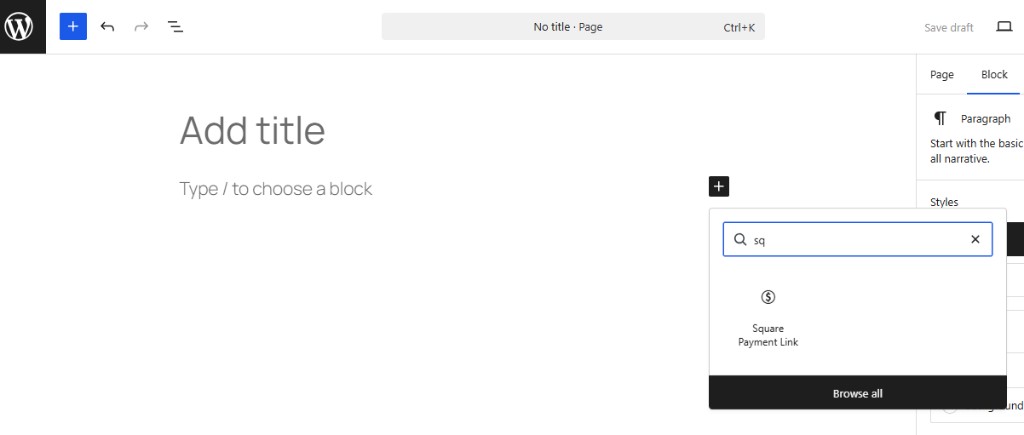
- Set amount and button label in the block sidebar.
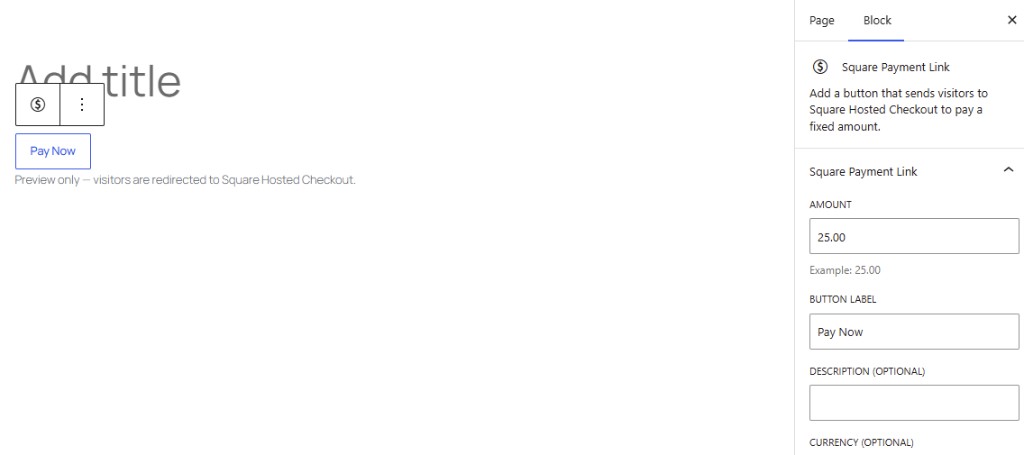
Elementor
- Edit a page with Elementor.
- Search widgets for Square Payment Link.
- Set amount, label, and description.
Beaver Builder
- Open Beaver Builder on a page.
- Find Square Payment Link under Payments Square Connect.
- Configure amount and label.
After payment
The buyer returns to your site with a thank-you message. Refunds are handled in the Square Dashboard, not WooCommerce.
Wallets
Payment links use the same Checkout Settings wallets as WooCommerce (Apple Pay, Google Pay, Cash App Pay, Afterpay when enabled).